One platform to sell the whole development.

Navi turns your project into a live 3D experience and runs the sales process behind it. Explore the two sides of the platform.

Show your project. Track it. Close the deal.

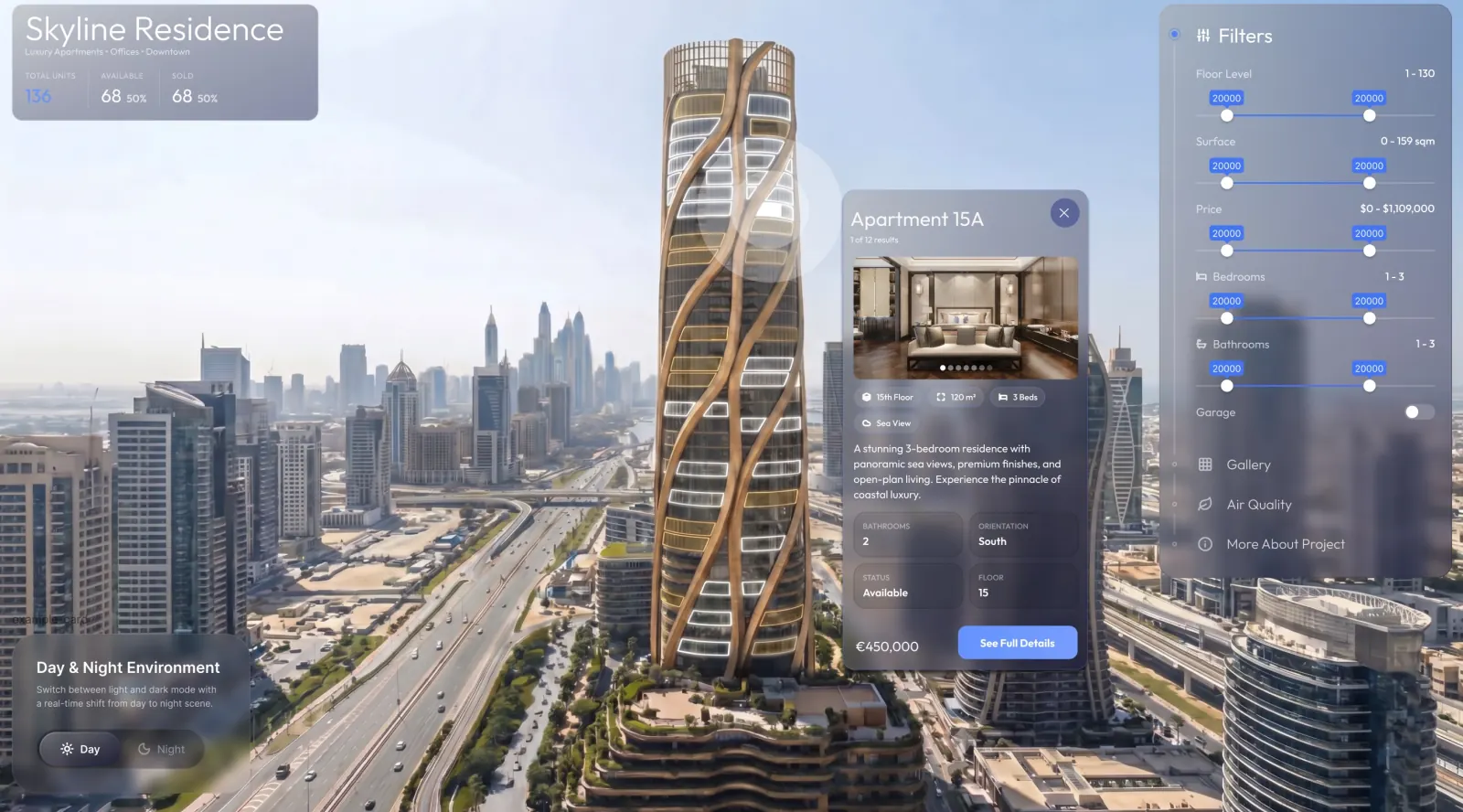
3D Building

A building buyers walk through in the browser.

Orbit the whole development day-to-night, then step inside a unit — no app, no download.

  • 2- and 4-point orbit, day to night
  • Massing, light and views from every side
  • Open a unit and reserve from the model
Explore the Viewer →
Inventory

One honest source of truth for every unit.

Price, plans, specs and status in one place — reserve a unit and it greys out in the 3D model instantly.

  • List, grid and table views
  • Available · Reserved · Sold, per building
  • Filters: price, beds, type, floor
  • CSV import
Explore Sales workspace →
CRM

A pipeline built to close property.

Every lead tied to a real unit, from first contact to contract.

  • Kanban: New → Viewing → Offer → Closed
  • Per-stage value, counts and % change
  • Lead detail: requirements, activities, notes
  • Call, email or schedule in one click
Explore Sales workspace →
Calendar

Every viewing and follow-up in one place.

Month, week or day — with the right agent on each.

  • Viewings, calls, meetings and tasks
  • Filter by type and agent
  • Google Calendar synced
Explore Sales workspace →
Dashboard

The whole portfolio at a glance.

Know where every project stands and export a clean investor report.

  • Revenue, active leads, deals closing, conversion
  • Revenue chart · 7D / 30D / 12M
  • Pipeline funnel and live activity
  • Per-project or portfolio · PDF export
Explore Sales workspace →
AI Assistant

A daily briefing that runs the sale for you.

Navi surfaces the leads, viewings and the hottest close — before you ask.

  • Daily briefing: new leads, today's viewings, best close
  • Ask “Summarize today's leads”
  • Flags units that need attention
One AI, both sides →
NAVI AIReady · Ask anything
Good morning, Marko. You have 14 new leads, 3 viewings today, and PH-68A is your hottest close opportunity. How can I help?
What's my best close this week?Summarize today's leadsWhich units need attention?
What's my best close this week?
James Thornton on the €1.1M penthouse — offer expires Friday. Push the signed reservation today.
ActionUnit 4501 · no visuals — recommend renders via Navi Studio

Sales workspace — everything that runs the sale.

Dashboard
CRM · pipeline

The Viewer — a showroom that's always open.

Orbit
Navi 3D building day to night
Reserve
Reserve from the model
Showroom

Buyers explore, filter and act — every step lands in your Sales workspace.

Explore the Viewer →

One AI. Both sides of the sale.

For your team

Starts your day with a briefing — new leads, today's viewings, a drafted follow-up.

NAVI AI Ready · Ask anything
Good morning, Marko. You have 14 new leads, 3 viewings today, and PH-68A is your hottest close opportunity. How can I help?
What's my best close this week? Summarize today's leads Which units need attention?
What's my best close this week?
James Thornton on the €1.1M penthouse — offer expires Friday. Push the signed reservation today.
Action Unit 4501 · no visuals — recommend renders via Navi Studio
AI in Sales workspace →
For your buyers

Answers every question inside the model, day and night — and hands your team the intent.

NAVI AI
Two bedrooms with a sea view, under €1.2M?
3 units match. Unit 12B has the widest terrace — want to step inside?
Recommended
Unit 12B · Floor 12
2 bed · 2 bath · 96 m² · Sea view
€1.14M
Unit 9A · Floor 9
2 bed · 2 bath · 88 m² · Corner view
€1.05M
Show me inside Compare both Book a viewing
Show me inside Unit 12B
Here’s the living room facing the sea — step into the 360° tour.
360° tour
New lead → CRM
AI in the Viewer →
For your team · Admin

Your day, briefed

New leads, today's viewings, your hottest close — waiting for you every morning.

Follow-ups, drafted

Navi AI writes the first version; you review and send. You stay in control.

Ask your portfolio

Plain-language questions across projects, units and leads — answers from live data.

Signals, not just stats

Flags units that need attention and tells you why — and can route new visuals via Navi Studio.

For your buyers · Viewer

Ask in plain language

“Two bedrooms with a sea view, under €1.2M?” Buyers ask; the AI walks them to the right unit.

Open day and night

Answers unit, pricing and plan questions inside the model — long after your sales office closes.

Guided, not searched

The camera flies to units that match. Buyers stop scrolling floor plans and start comparing homes.

Every chat becomes intent

Conversations land on the lead in your CRM — budget, wishes and objections included.

On Polaris, Navi AI drafts the offer.

One system, every touchpoint.

Viewer → Sales workspace

Exploration becomes a tracked lead the moment a buyer acts.

Multi-project

A global switcher keeps every development in reach.

Mobile & desktop

Every screen, desktop to mobile.

Light · Dark · Auto

Follows the workspace and device theme.

Always in sync

Mark a unit reserved in the Admin — it greys out in the 3D model instantly. One change, every touchpoint.

No training needed

Your team runs it from day one. Built for property sales, not for software people.

Fits your stack

Salesforce, HubSpot and Google Calendar sync — leads and viewings stay where your team already works.

Every change logged

Prices, statuses and edits carry an audit trail. You always know who changed what, and when.

Works with the tools your sales team already runs on.

Sync leads to Salesforce, book viewings in Google Calendar, and keep everything in one branded platform.

Salesforce Sync
Google Calendar Google Cal Viewings
Zendesk Zendesk Support
CSV Import Inventory
PDF Export Investors
More Roadmap
What your buyers see

A showroom that's always open — live 3D, in the browser.

See the Viewer →
For your team

Inventory, CRM, calendar and reporting — one workspace.

Explore Sales workspace →

Questions before you dive in.

What does Navi include?
A live 3D Viewer for buyers and a Sales workspace for your team — inventory, CRM, calendar, dashboard and AI — so exploration and closing stay in one place.
Who builds the 3D model?
Darkroom builds it as part of setup — or we ingest compatible assets you already have. If your files plug in cleanly, there's no setup fee.
Does it sync with Salesforce?
Yes on Voyager+. Leads and stage changes stay in sync with the CRM your team already runs.
How is Navi different from a nice 3D render?
A render shows the building. Navi sells it — live inventory, a CRM that knows which units are reserved, calendars, and buyer tools like 360° tours, all in one place.
Architectural concept visual by Darkroom Studio for Navi

See your development sell itself.

Get a walkthrough and we'll show Navi running on a project like yours — the buyer experience and the sales tools behind it.

Get a walkthrough